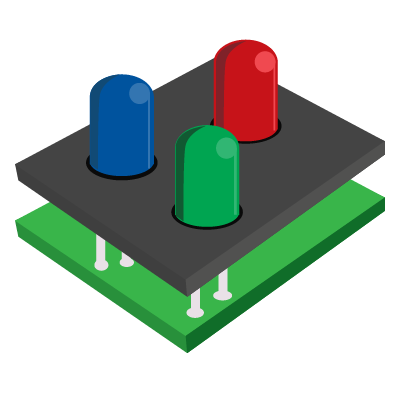
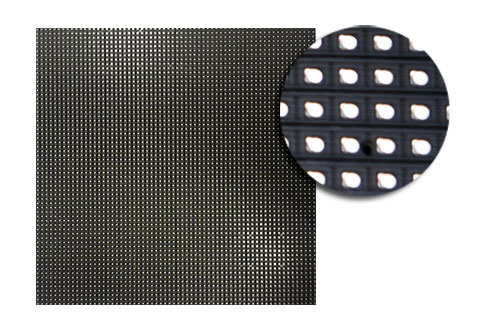
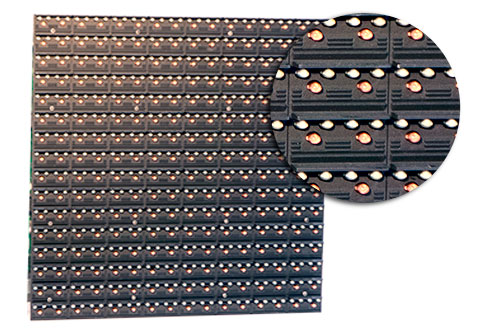
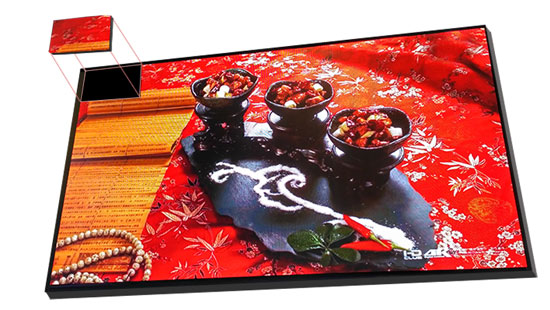
LED display systems are actually very simple in concept, they are simply what you would see on a computer or TV screen. An LED display system would convert the input source into a format accepted by LED displays.


Digital LED Panels

An LED panels are comprised of 4 main components:

1.LED Lamp Embedded Panels

2.Aluminum or Iron Housing Cabinets

3.Receiving Cards

4.Power Units

The receiving cards are responsible for processing signal and displaying them on the panels, finally giving you the dynamic media you want to display on your digital signage.

Aluminum and iron housings provide structure, rigidity, and high IP ratings, protecting against the elements.


The Source

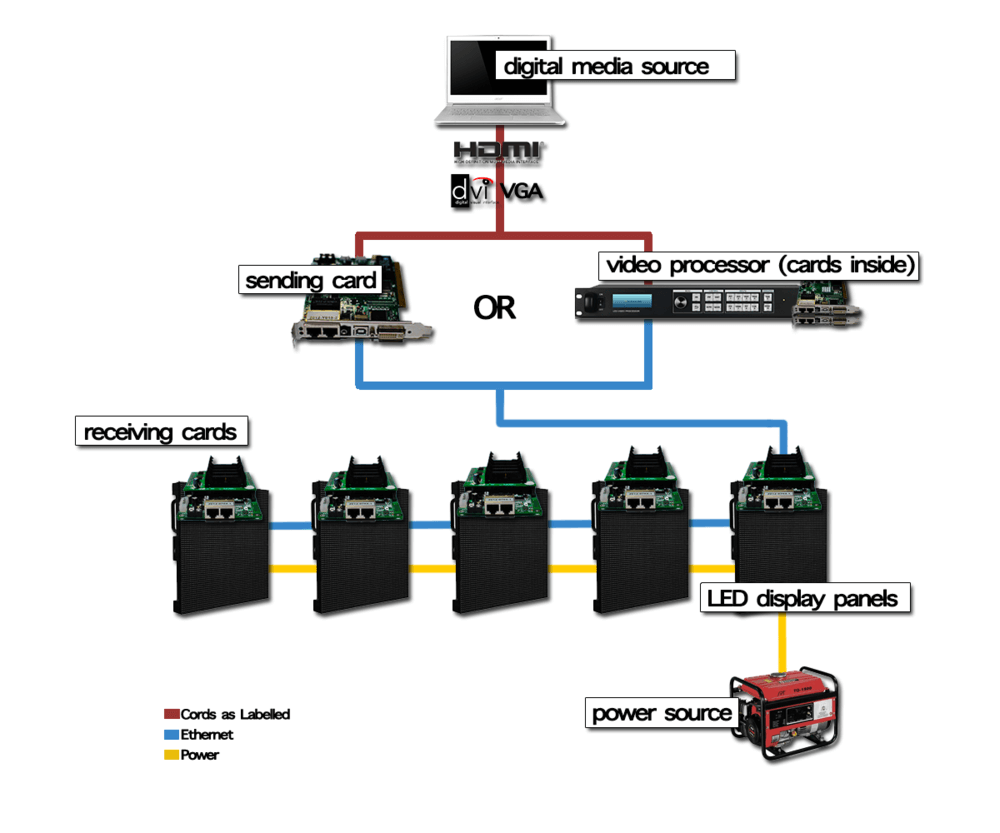
A computer with a video output port serves as the media source. The output, be it VGA, HDMI, or DVI, will plug into a conversion hub.

LED display systems


Converter

Signal from a computer will be converted into ethernet signal through a video processor or sending card,then passed along to the digital LED display.

Video processors are standalone units while sending cards are intended to be embedded into an existing computer.

Video Processors

Video processors enable you to have total control over your screen inputs, giving you the ability to change on the fly and put on dynamic shows.

Sending Cards

Bridging the gap between media sources and the LED display panels, sending cards transmit digital signal to the panels.

Receiving Cards

Inside each LED display panel lives a receiving card. These convert signal to visual experiences on the screen.


Related products: P6.67 outdoor led display, outdoor p3.9 led screen rental


outdoor led display


You want the best outdoor led display for your business impact. Start with brightness, pixel pitch, IP rating, and viewing angle. Match your outdoor led screen features to your location and goals. The market for outdoor led display hits $11.3 billion in 2025, driven by dynamic advertising and engaging content. Chipshow offers a setup guide for both outdoor transparent led display and indoor led display.


Outdoor LED Screen Buying Guide

outdoor led display


When you pick an outdoor LED screen, you need to know the important features. This guide helps you focus on what matters for your business. You want your screen to be easy to see, last a long time, and help your business stand out. We will explain each feature so you can choose wisely.


Brightness and Visibility

Your outdoor LED screen should be bright enough to see in sunlight. Brightness uses nits as a measurement. More nits means a brighter screen. For sunny places, you need at least 2,500 nits. Some screens can reach 10,000 nits for very bright spots.

Here is a table with brightness levels:

Application Scenario Recommended Brightness (nits)
Outdoor facing direct sunlight 7,000–10,000
Shaded Exteriors 1,500–2,000
High-Glare Zones 3,000–4,000

If your screen faces the sun, pick the highest brightness. This keeps your message clear and easy to read. Chipshow makes screens that meet these brightness needs, so your message always shows up.

Tip: Always look at the brightness rating before buying. High brightness helps people see your message all day and night.


Pixel Pitch and Resolution

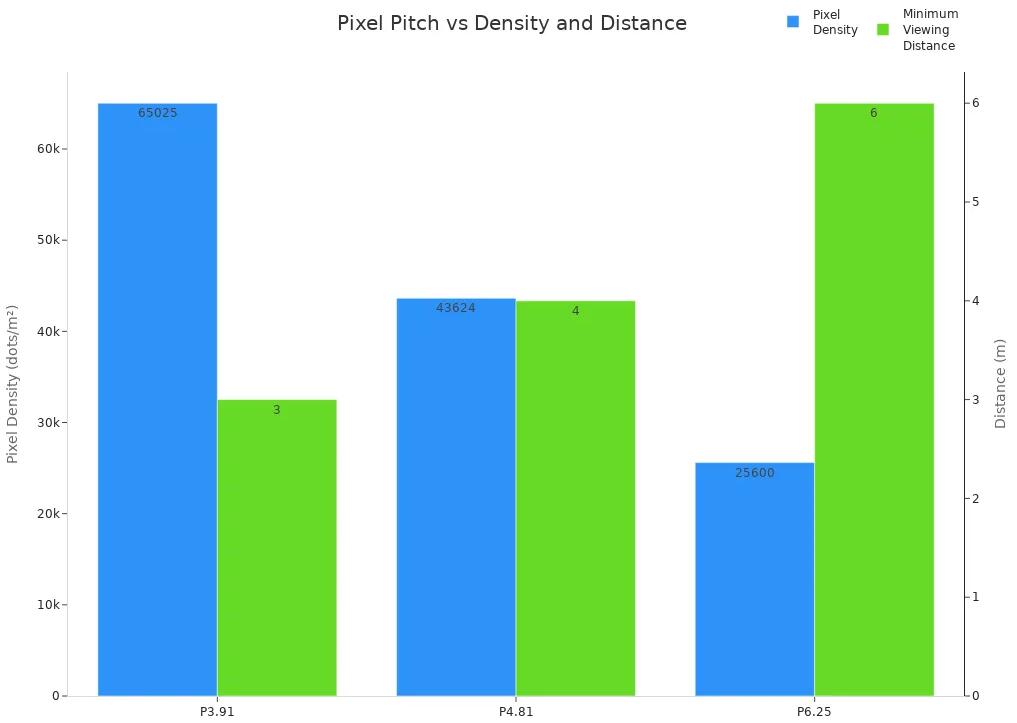
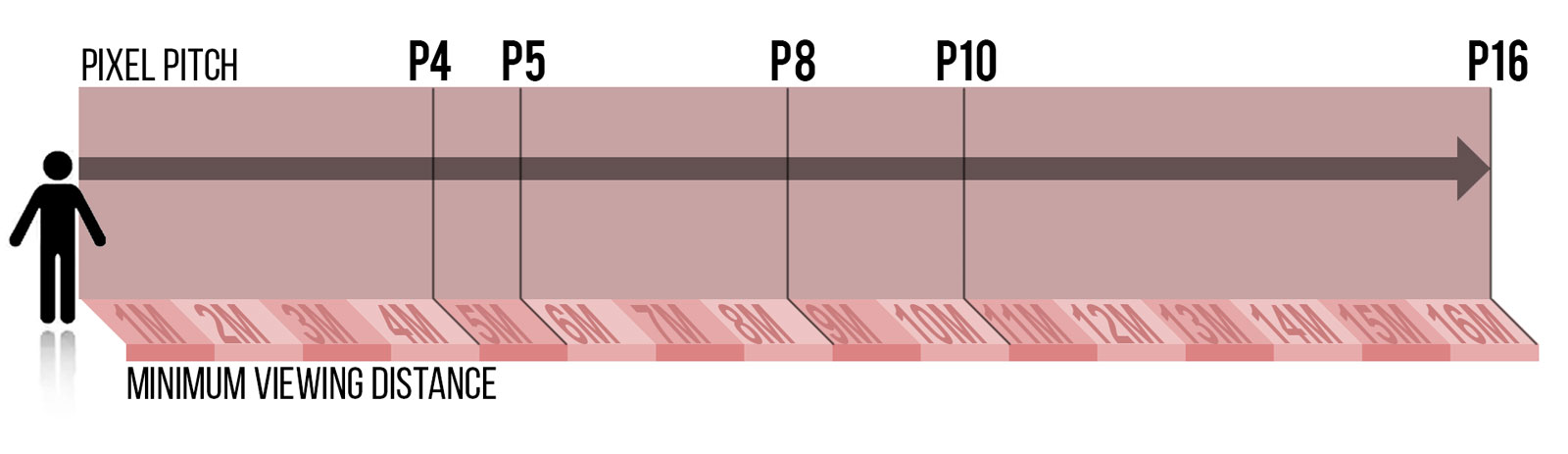
Pixel pitch tells you how close the pixels are. Smaller pixel pitch gives sharper pictures. For outdoor screens, match pixel pitch to how far people stand from the screen.

Here is a table for pixel pitch:

Pixel Pitch Pixel Density (dots/m²) Minimum Viewing Distance
P3.91 65,025 3m
P4.81 43,624 4m
P6.25 25,600 6m


If people stand 5 meters or more away, a pixel pitch of 5mm or bigger works for simple graphics. For live shows, you might pick 8mm to avoid blurry images. Chipshow offers many pixel pitch choices, so you can find the best one.

Note: Small pixel pitch looks best for sharp images. Bigger pixel pitch works fine if people are far away.


IP Rating and Weatherproofing

Outdoor screens face rain, dust, and wind. The IP rating shows how well your screen handles water and dust. Most outdoor screens need at least IP65. If your area has lots of rain or dust, pick IP66.

IP Rating Protection Level Recommended Use
IP65 Dust tight, water resistant Outdoor LED screens in moderate rain
IP66 Dust tight, high-pressure water Outdoor LED screens in heavy rain/extreme weather

A high IP rating means your screen lasts longer and needs less fixing. Chipshow screens have strong IP ratings, so they work well in any weather.

These screens are tough. They work in sunlight, rain, and heat. They grab attention day or night.


Viewing Angle

The viewing angle tells you how many people can see the screen clearly. For public places, you want a wide angle, like 120° to 140°. This lets more people see your content.

If you want your screen to cover a busy street, pick one with a wide viewing angle. Chipshow led creens have wide angles for better coverage.


Temperature Regulation

Outdoor screens deal with hot and cold weather. Good temperature control keeps your screen working well. New screens use fans, heat sinks, and sometimes heaters to handle tough weather.

If your screen gets too hot, it breaks faster. This means more repairs and a shorter life. Pick a screen with strong heat control, like Chipshow, for better energy use and performance.

Energy saving is important. A well-cooled screen uses less power and lasts longer.


Buying Guide Checklist

Here is a quick checklist to help you pick your outdoor LED screen:

With this guide, you can pick the best outdoor LED screen for your business. Your screen will show clear images, work well, and save energy for years.


Matching LED Video Display to Business Needs

outdoor led display


Location and Audience

You want your led video wall to help your business. First, think about where you will put your outdoor led screen. Is it near a busy street, a mall entrance, or an open plaza? The place you choose is important. Outdoor led displays must be weatherproof. They need a high IP rating to handle rain and dust. Brightness should be at least 6000 nits for sunlight. This keeps your message easy to see.

Your audience size matters too. If you expect less than 100 people, use an 8′-12′ wide led video wall. For 100 to 500 people, pick a 12′-24′ wide screen. If you want to reach over 500 people, use a led video display bigger than 24′ wide. Big led screens get more attention and help people notice your business.


Number of People Recommended Width
< 100 8′-12′
100 – 500 12′-24′
500+ 24′+

You should check if your led display reaches your audience. Use surveys, ad views, and conversion rates to find out. Looking at data helps you change your plan and get the most from your led display.

Tip: Put your led video wall in busy places. This helps more people see it and helps your business.


Size and Resolution

Choosing the right size and resolution is important. The size depends on where you put the screen and how far people stand. In busy areas, led video walls are often bigger than 50 square meters. Stadiums, festivals, and malls use large screens for strong visual impact.

Resolution makes your images look sharp. If people stand far away, you can use lower resolution. Highway billboards work well with fewer pixels. For close views, like in a plaza or mall, you need high resolution. This makes your led display look better and keeps people interested.

Aspect Ratio Best Use Case
16:9 Video ads, presentations
4:3 Static images, information boards

High-resolution led screens show bright colors and clear text. Your guide should help you match resolution to your content. If you want to show detailed graphics or videos, pick a led video wall with smaller pixel pitch and higher pixel density.

Note: The right resolution makes your led video display work better and stand out.


Budget and Maintenance

Budgeting for your led video wall means more than just buying it. Installation costs can be from $1,000 to $20,000. The price depends on size and setup. Outdoor led screens cost about 2.7 times more per square foot than indoor ones. They need extra protection and brightness. But they last longer and save money over time.

You need to think about maintenance too. Plan for yearly service packages starting at $500. Clean your led display every six months. Check the system every month. Regular care stops overheating and helps your led video wall last longer.

Here are some smart ways to budget:

Strategy Description
Location Selection Put your led video wall in busy places for better results.
Cost Control Use energy-saving equipment to lower costs.
Supplier Comparison Get quotes from different suppliers to find the best price.

Pro Tip: Buying everything from one supplier, like chipshow, can save money and make setup easier.

A good guide helps you balance costs now with savings later. Buying a strong, high-quality led video display means fewer repairs and better value. You get a led screen that helps your business for many years.


You want your led video wall to make a real business impact. Follow this guide to pick the right outdoor led screen:

  1. Check resolution for sharp images.
  2. Match brightness and viewing angle to your space.
  3. Choose a durable led display.
  4. Pick the best led video wall size and setup.
  5. Plan your budget.

A strong led video display with high resolution and weatherproof features keeps your led display working for years. Future-proof your led video wall for new tech and easy upgrades. Trust this guide to help you choose a led video display that fits your needs and boosts your business.

Ready to set up your led video wall? Make your choice with confidence and watch your led display shine!

What is an LED display?

LED display or LED sign is an electronic sign consists of a matrix of individual LED lights (LED pixels) that make image, text or video together. LED pixels are placed very close together and from relatively far distance the eyes won’t be able to see the gap between the pixels result in an acceptable image quality with minimum pixilation. Compare to LCD digital signage (like TV), LED signs and LED displays provide lower resolution due to lower number of pixels. But, brightness and color production is much more eye-catching which is necessary for outdoor and behind the window digital signage.


Viewing Distance

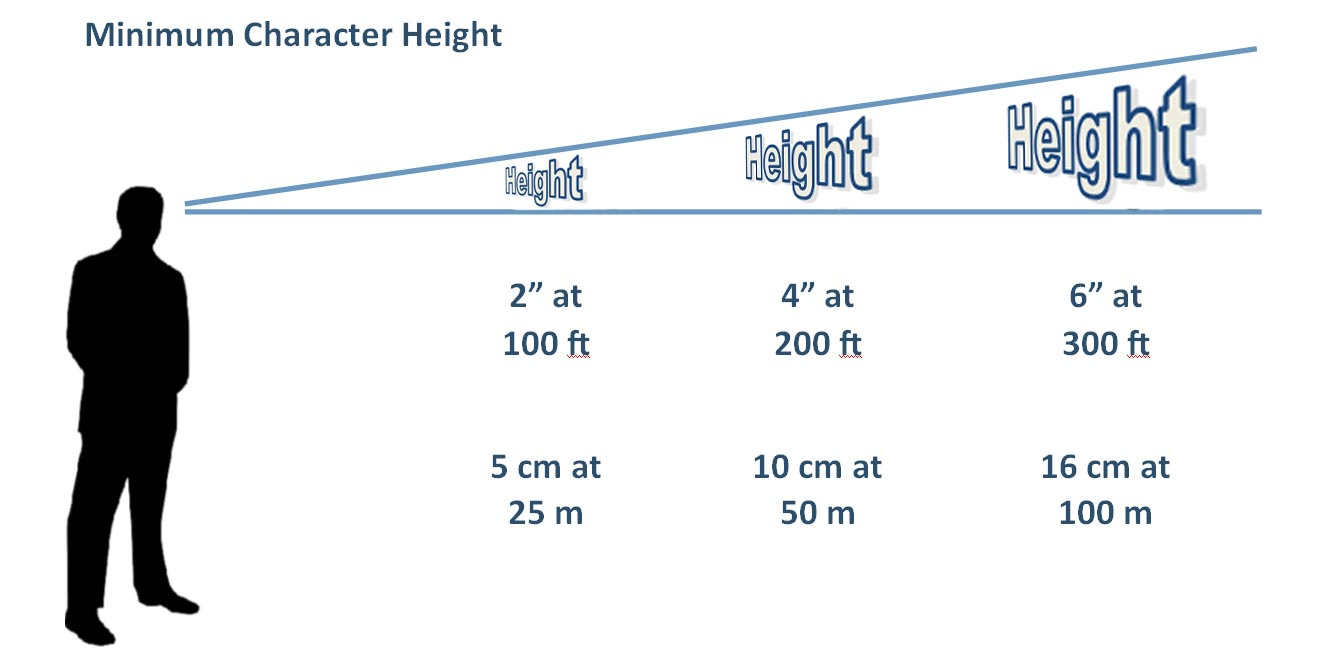
The most important factor of LED signage is viewing distance. If your sign will be viewed from long distance by people in the car driving fast then you need a big character size to make it readable. As a rule of tomb you need at least 2 inch of character height for each 100ft of viewing distance to make it readable. For full-color sign with image and video support you may need bigger size to make better impact on viewer.

Pixel Pitch and resolution

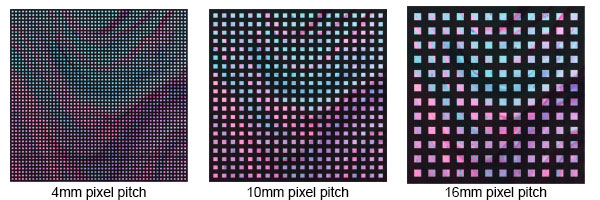
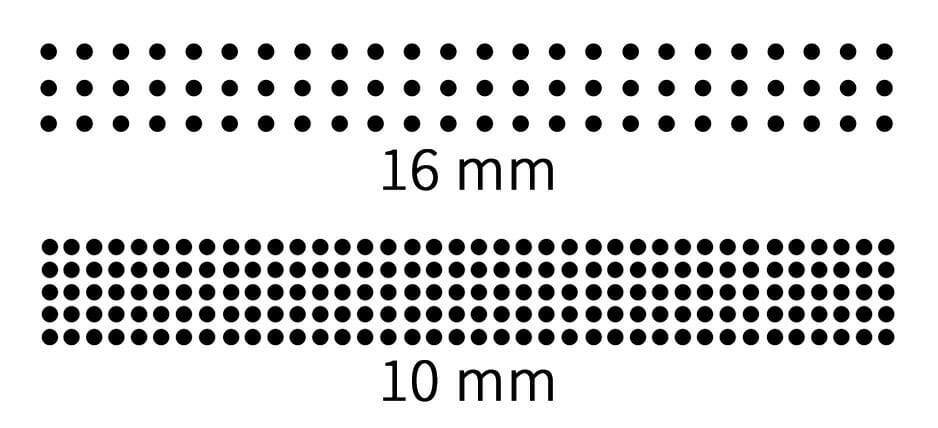
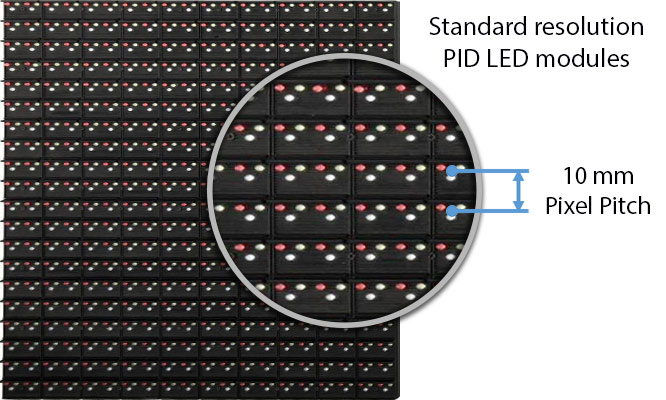
Pixel pitch is center to center distance of pixels. The shorter pixel pitch the higher resolution. Viewing distance is the main factor to decide about the pixel pitch. For normal indoor LED sign with image and video support P6 LED modules (6mm pitch) is a standard resolution. However, in some case required high resolution or very close viewing distance P4 LED modules (4mm pitch) is recommended. For outdoor application P8 outdoor led display or P10 outdoor led display (8mm and 10mm pixel pitch) for short viewing distance and P16 modules (16mm pitch) for far viewing distance are mostly used.


Controlling system

Synchronous

This type of LED control card need a computer system to show advertising media on LED display. This type of control card are suitable for application you need to change your display media very often or you need to show lots of media on it (like huge outdoor TVs or huge billboards). There are different synchronous control cards with network, Wi-Fi or GPRS options.

Asynchronous

Unlike the synchronous control cards, asynchronous control cards don’t need any computer to control it. All advertising media is saved in internal memory then control card play it according to the programmed schedule. This type of control card is suitable for any applications doesn’t need every day update like business LED signs, School LED Signs, behind the window LED sign. This type of control card is available with USB, cable, Wi-Fi option etc.


Chipshow is a professional full color led display manufacturer with 20 years experience, we have lots of led sign projects around the world. Welcome to contact us to get a led sign quote!


How to make a curved outdoor advertising led screen


Now outdoor digital advertising led screen is popular,sometimes customer ask me how can I make a outdoor curved led screen.


Before giving out our solution, especially before production, we would like to collect the following information:

1:Is it convex or concave curve?

2:Is it ellipse, semicircle, or 360 degree LED display?

3:What is the total length and height of the curved LED display?

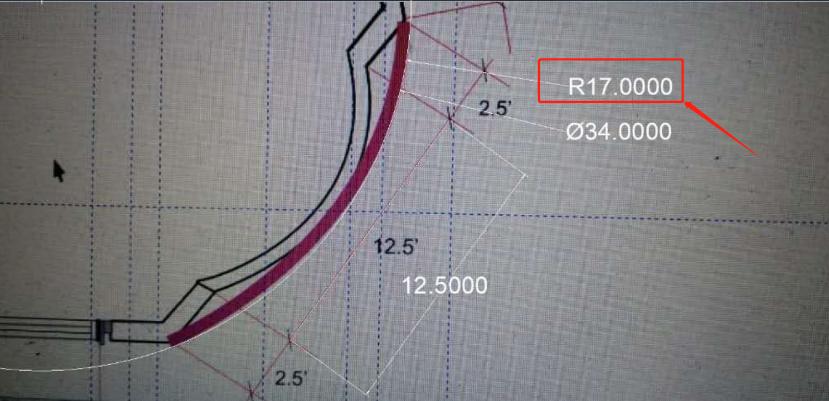
4:What is the radian and radius? Please provide the accurate architectural drawing for our engineer to calculate correctly.

The distance from the LED display to the ground and the normal viewing distance? This helps to choose the product model based on the pixel pitch.

In addition, to install a curved LED display, the support structure needs to be customized according to the drawing of the LED display.


Below is our outdoor curved led screen new case for reference:

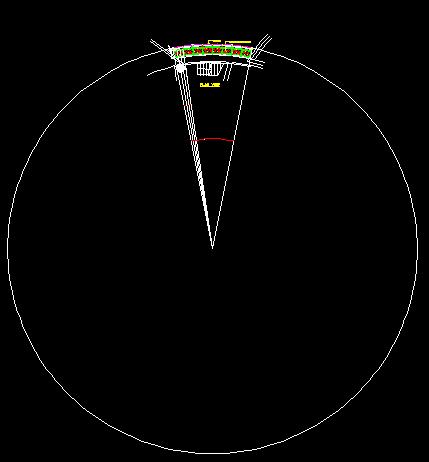
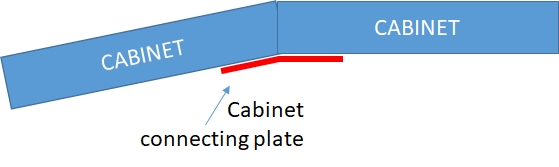
1. We should know the screen Radius


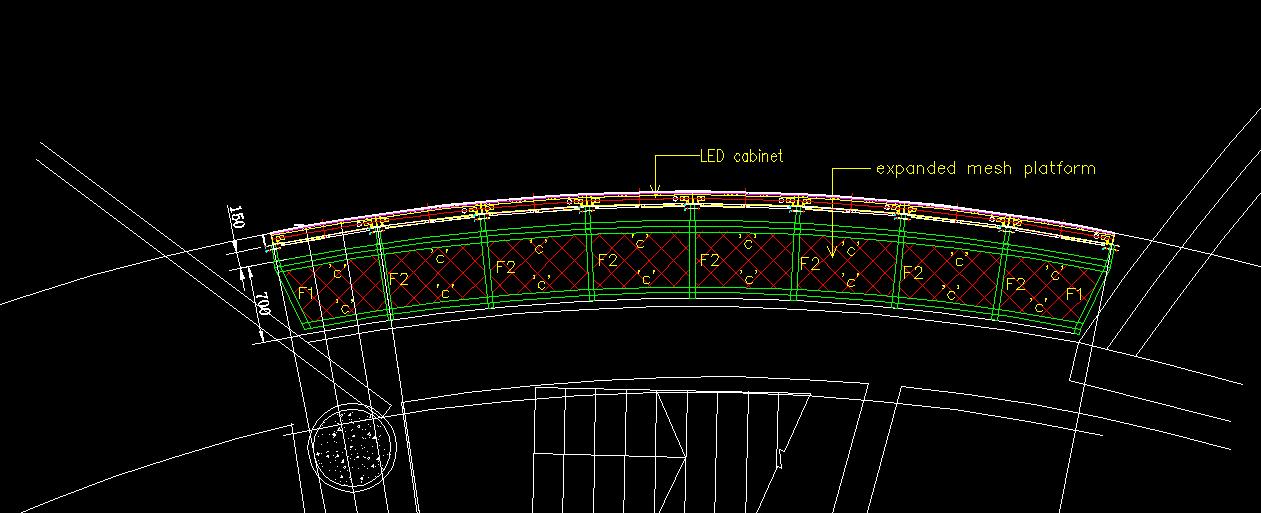
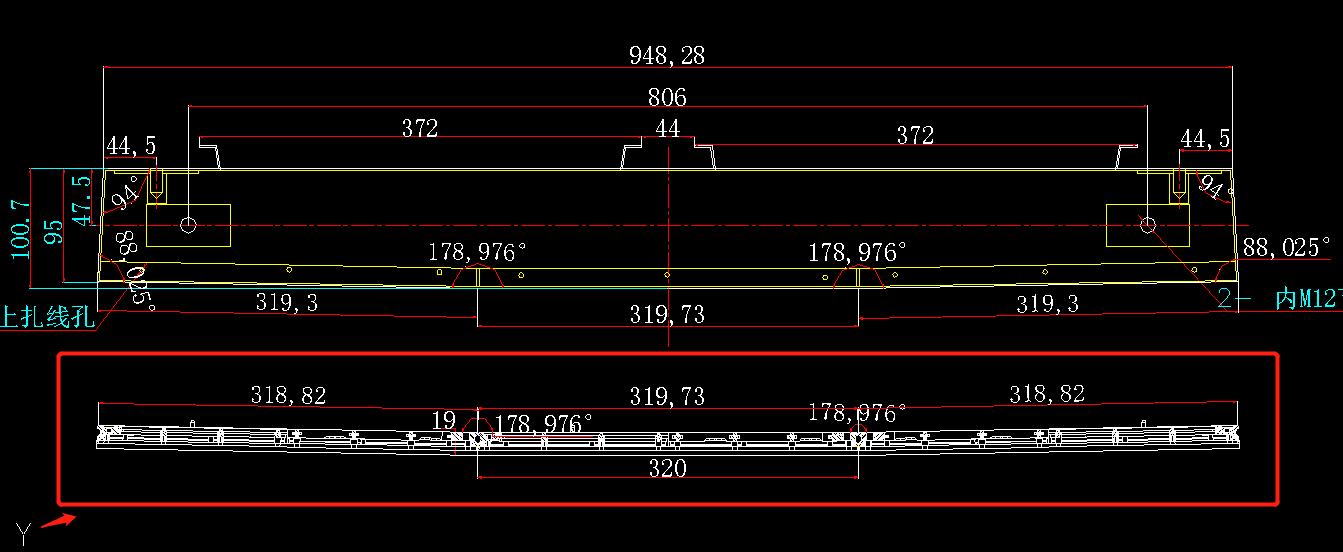
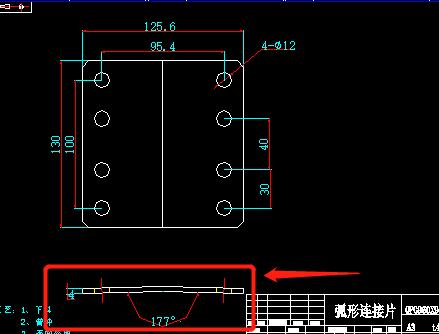
2. Then we using CAD figure out the cabinet should be make curved or not.


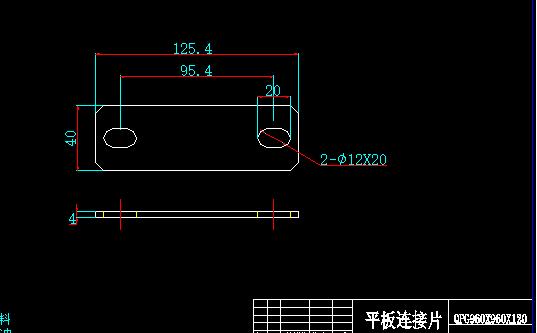
3. Aslo the plate for lock between the cabinet should be have curved one and flat one.

Plate degree is follow the cabinet degree.


In addition, to install a curved LED display, the support structure needs to be customized according to the drawing of the full color LED display.


Learn More About LEDs

1. What is an LED?

A light emitting diode (LED) is a tiny, electronic semiconductor that converts electric energy into visible light. The chemical compound used within an LED determines its color, brightness and power efficiency. Unlike incandescent lamps, LEDs have no filaments that can burn out or fail.


Surface Mount LEDs

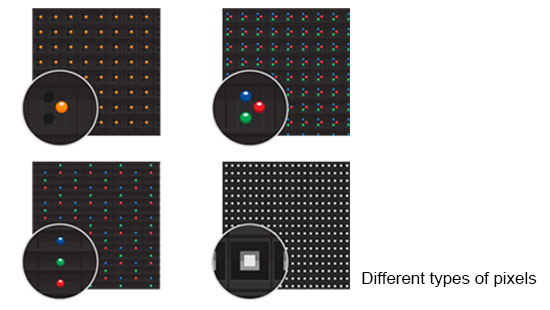
Surface Mount Devices, or SMD for short, refers to the LED lead frame mounting method. LEDs are mounted to the surface of the circuit board. The SMD contains red, green and blue die.

Through-Hole LEDs

Through-hole LEDs are mounted with leads protruding through the circuit board and appear to stand taller. Each LED is a single-color die of either red, green or blue.


LEDs come in two different forms.

Manufacturers use several types of LEDs to construct digital displays. The two most common are Through-Hole LEDs and Surface Mount Device (SMD) LEDs, also known as Surface Mount Technology (SMT). Each type has its respective advantages that make them preferable for different applications.


SMD LEDs

Total light emitted isn't concentrated in a focused area since SMD LEDs do not have directional reflector cups. Instead light disperses evenly across both horizontal and vertical angles, providing wider viewing angles. This makes SMD LEDs an excellent choice for most indoor applications as well as some tighter pitch outdoor applications.

Benefits of SMD:

· Outstanding color blending at short viewing distance

· No color shift at extreme angles

· Wide viewing angle


Through-Hole LEDs

Through-hole LEDs use a reflector cup and an epoxy lens package. This combination as well as the type of die used, plays a role in determining the elliptical viewing cone produced. A through-hole LED's reflector cup focuses the light emitted by the die into a specific viewing area.

Benefits of Through-Hole:

· Optimized for moderate to longer viewing distance

· Louvers deflect sunlight for higher contrast

· Black matte finish reduces reflection

· Brighter than SMD LEDs

Small Pitch LED Display


2. What is a module?

LED modules are made up of parts that form the building blocks of full color LED displays. Rows of modules line together to arrange the LEDs in different variations depending on the requirements.


3. What is a pixel?

Pixels, short for picture elements, are points of light that illuminate to form visuals. A pixel can be made up of a single LED, multiple LEDs of the same color or multiple LEDs of different colors. They are the smallest elements of the electronics display system that can be individually controlled and turned off or on at various brightness levels.

Small Pitch LED Display


Pixel pitch and Resolution.

Pixel pitch influences the resolution of the LED display screen. More pixels placed together means higher resolution. High resolution means the image will be clear to viewers even when viewed from close proximity. We will help you to balance the cost as well as the perfect pixel pitch for your installation, to ensure the best fit for your viewing experience as well as your budget.


4. How Does Pixel Pitch Affect Minimum Viewing Distances?


Viewing distances are calculated based on the display type and the distance from the display. Each display will have a minimum and a maximum viewing distance that may vary based on application and intended use.


Selecting the right pixel pitch is important because they influence the resolution of the display screen. High resolution means the image will be clear to viewers even when viewed from close proximity. Whereas lower resolution means large LED display panels may look great from a distance, but if you move closer to them, they will become uncomfortable to view,our website:https://www.chipshow.com.


LED display solutions vary with Installation Methods


1. On poles or on top of roof

The outdoor led display screen is installed on the pole or the roof to broadcast advertisements, Chipshow C-Fit P2 / P3 / P4 / P5 / P6 / P8 / P10 led display s the ideal choice,that 960 * 960mm die cast aluminum box has low weight, high precision and high flatness of the whole screen. Then, confirm the appropriate pitch according to the screen area and the best viewing distance.


2. Wall mounted installation

The LED display screen is attached to the outdoor wall to play advertisements. With our C-Fit-Easy P5 / P6.67/P8/P10, you can make only 300mm thick the steel structure for heat dissipation owing to its front and rear dual maintenance modules, so light weight and beautiful to hang on the wall.

Meanwhile,we can use c-smart P4 / P5 / P6.67 / P10 which is more convenient solution for the wall mounted display within 20 square meters. The module frame can be directly fixed on the wall with expansion screws that help to save money for structure and labor.


Light weight LED screen fix on the wall of the conference room, Chipshow C-MAX / c-pad-u p1.26/p1.5/p1.9/p2.5 dual maintenance indoor display screen is ideal because of lightweight and easy to install and maintain.


3. Mobile LED screen

The display screen installed on the trailer should be light and thin, with simple structure and anti vibration. Our c-fit / c-fit-easy / c-smart / c-lite are good choices.


4. Hanging under the ceiling

If LED screen is in the store glass but face outside, then outdoor high brightness display is necessary, you can choose c-smart / c-lite / c-transparent.

If the LED display is in shopping mall and show inside, you can use the c-lite / c-lite-d p2.6/p2.97/p3.91 indoor display.


5. Rental screen

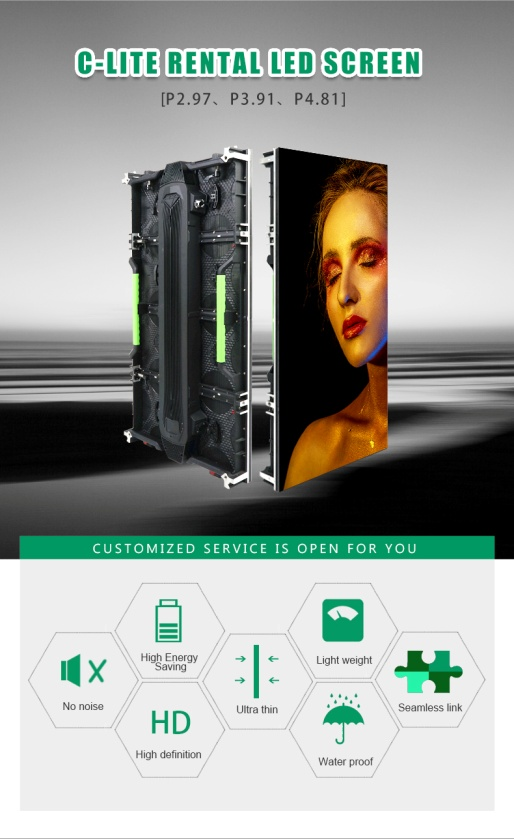
It is suspended on the truss, supported on the ground or stage, and used c-lite / c-lite-d / c-lite-e p2.6/p2.97/p3.91/p4.81. Moreover, we always keep c-lite p3.91/p4.81 in Netherlands warehouse, which can be delivered at any time.


6. Perimeter LED screen in sport field

It is installed around football, basketball, ice hockey and other sports venues for advertising. The c-perimeter P8 / P10 die-casting aluminum box is equipped with brackets and rubber pillows, and the lamp surface is protected by a soft mask.


What are rental LED screens for stand and conference?


Rental LED screens for stands and conferences are LED panels capable of reproducing high resolution images and videos with a luminosity that is superior to other devices, such as traditional monitors and projectors not allowing to see the content correctly, either due to lack of luminosity or annoying reflections on their displays.In this way, an unbeatable brightness is guaranteed.


LED Rental Display Screen

It is able to be disassembled, built and transported frequently, so the box should be disassembled conveniently in structure design, light in weight and convenient in transportation. Usually the LED Display Panels for rental is made of die-cast aluminum box, which is light in structure, high in stability, easy to install and disassemble at any time. It is suitable for holding singing, meeting and stage performance, and both for indoor and outdoor.


Indoor Rental LED Screens

Not waterproof (IP30) and in low brightness (800nits) since it will only be used indoor and will not exposed in sunlight.


Outdoor Rental LED Screens

Waterproof Rated for outdoor use with high-brightness >4500nits.

IP65 front and IP54 back.


What are rental LED screens for stand and conference?

What Is Pixel Pitch And Screen Resolution?


1. LED Screen Pixel Pitch


The distance between the LED screen diodes determines the resolution of the screen. From the center of each set of red, green, and blue diodes, the distance to the center of the adjacent group is measured. This distance is called the pixel pitch. Each set of diodes together form a pixel – or pixel.


If the LED screen has a pixel pitch of 1 cm, each pixel can have 100 x 100 pixels. Square screen. The resolution on the screen is set to the number of pixels in height and width. If your screen is 6 x 8 meters and the pixel spacing is 1 cm, the resolution is 600 x 800 pixels.


2. Image Resolution


Image resolution is the detail an image holds. The term applies to raster digital images, film images, and other types of images. Higher resolution means more image detail.


Resolution refers to the number of pixels in an image. Resolution is sometimes identified by the width and height of the image as well as the total number of pixels in the image. For example, an image that is 2048 pixels wide and 1536 pixels high (2048 x 1536) contains (multiply) 3,145,728 pixels (or 3.1 Megapixels).


Image resolution can be measured in various ways. Resolution quantifies how close lines can be to each other and still be visibly resolved. Resolution units can be tied to physical sizes , to the overall size of a picture, or to angular subtense.


The measure of how closely lines can be resolved in an image is called spatial resolution, and it depends on properties of the system creating the image, not just the pixel resolution in pixels per inch (ppi). In effect, spatial resolution refers to the number of independent pixel values per unit length. Get more details of small pixel pitch led screen from www.chipshow.com.


small pixel pitch led screen


- tags:

Do you know what is Image Sticking?


If you remain a fixed image on LCD Display for a long period of time, you may experience a phenomenon called Image Sticking. Image Sticking - sometimes also called “image retention” or “ghosting”- is a phenomenon where a faint outline of a previously displayed image remains visible on the screen when the image is changed. It can occur at variable levels of intensity depending on the specific image makeup, as well as the amount of time the core image elements are allowed to remain unchanged on the screen. In POS applications, for example, a button menu which remains fixed, or in which the “frame” elements (core image) remain fixed and the buttons may change, may be susceptible to image sticking. It is important to note that if the screen is used exclusively for this application, the user may never notice this phenomenon since the screen never displays other content. `It is only when an image other than the “retained” image is shown on the screen that this issue becomes evident. Image sticking is different that the “burn-in” effect commonly associated with phosphor based devices.


What causes Image Sticking? 

Image sticking is an intrinsic behavior of LCD displays due to the susceptibility to polarization of the interior materials (liquid crystals) when used under static, charged conditions (continuously displaying the same image). The individual liquid crystals in an LCD panel have unique electrical properties. Displaying a fixed pattern - such as the POS menu described above – over prolonged periods can cause a parasitic charge build-up (polarization) within the liquid crystals which affects the crystals’ optical properties and ultimately prevents the liquid crystal from returning to its normal, relaxed state when the pattern is finally changed. This effect takes place at a cellular level within the LCD, and the effect can cause charged crystal alignment at the bottom or top of a crystal cell in the “z”axis, or even crystal migration to the edges of a cell, again based on their polarity. These conditions can cause image sticking over an entire area, or at boundaries of distinct color change respectively. In either case, when the liquid crystals in the pixels and sub-pixels utilized to display the static image are polarized such that they can not return fully to their “relaxed” state upon deactivation, the result is a faint, visible, retained image on the panel upon presentation of a new, different image. The actual rate of image retention depends on variation factors such as the specific image, how long it is displayed unchanged, the temperature within the panel and even the specific panel brand due to manufacturing differences among panel manufacturers.


How to Avoid Image Sticking?

- Try not to operate the LCD with a “fixed” image on the screen for more than 30 minutes.

- If you are operating the monitor in an elevated temperature environment and with a displayed image which is contrary to the recommendations in“For Software Developers”below, image stick can occur in as little as 30 minutes. Adjust your screen saver settings accordingly.  

1) Power down the unit during prolonged periods of inactivity such as the hours a store is closed or a shift during which the piece of equipment isn’t used.

2)Use a screensaver with a black or medium gray background that is automatically set to come on if the device is inactive for more than 5-10 minutes.

3)Avoid placing the monitor in poorly ventilated areas or in areas that will create excess heat around the monitor for software developers.

4)In defining the icons, buttons, or windows in the screen, try to utilize block patterns instead of distinct lines as borders for dividing the display into distinct areas.  

5) If it is necessary to display a static image, try to use colors that are symmetric to the middle gray level at the boundary of two different colors, and slightly shift the borders line once in a while.

6) Try to utilize medium gray hues for those areas that will have prolonged display times or remain static as other menu elements change.


How to Fix the Image Sticking?

Unlike the usually irreversible “burn-in” effects commonly associated with direct view phosphor display devices such as CRTs, an image retained on an LCD display can be reversed – often to a point of total invisibility. However, the severity of the underlying causes (as described above) of the image retained on a specific display, as well as the variation factors (see “For Software Developers” above) under which the retained image was created, will dictate the final level of retention reversal. One way to erase a retained image on a panel is to run the screen (monitor “on”) in an “all black” pattern for 4-6 hours. It is also helpful to do this in an elevated temperature environment of approximately 35º to 50ºC. Again, utilizing a dynamic screen saver with an all black background during prolonged idle display periods is a good way to avoid image retention issues.


Is Image Sticking Covered by TSD (Team Source Display) RMA Warranty?

Image sticking is a phenomenon inherent to LCD Display technology itself, and as such, the occurrence of this “ghosting” effect is considered normal operation by the manufacturers of the LCD display modules which are integrated into today’s monitor solutions. TSD does not warrant any display against the occurrence of image sticking. We strongly advise that you follow the operating recommendations listed above to avoid the occurrence of this phenomenon.


tslcd Reliability testing for Image Sticking: 

25, 60%RH/30 minutes.

Note: Switch the image to Grey 127 after displaying the 5*8 chess pattern for 30 minutes,the after image disappears within 10 minutes.


Maintaining consistent temperature and humidity levels is a cornerstone of quality assurance in industries such as manufacturing, research, and storage. These environmental factors, while often overlooked, can have far-reaching impacts on production outcomes, product longevity, and experimental accuracy. Advanced tools like temperature and humidity loggers, or sometimes with wireless data transferring functions like wireless data loggers have become indispensable for meeting the challenges of environmental monitoring in these contexts.

Effective environmental monitoring is not without its challenges. Addressing these requires not just the right tools but a deep understanding of the demands imposed by various applications.


Why Temperature and Humidity Monitoring Is Crucial?

Temperature and humidity are more than mere environmental parameters—they are critical factors influencing materials, processes, and the stability of products.


-Production Environments:

In pharmaceuticals and food processing, maintaining specific conditions is necessary to prevent contamination and ensure compliance with safety standards. Temperature and humidity loggers are critical for tracking these parameters throughout production.

In electronics, uncontrolled humidity can lead to condensation, corrosion, or electrostatic discharge, potentially damaging components. A reliable wireless data logger can provide real-time insights, enabling quick responses to changes.


-Research and Laboratories:

Experimental accuracy depends on stable environmental conditions. Variations in humidity or temperature can compromise results or invalidate data. Data loggers ensure these parameters are documented precisely, supporting reproducibility and compliance.

Sensitive equipment like microscopes or spectrometers often requires controlled surroundings to operate optimally.


-Storage and warehouse temperature humidity monitoring:

Products like vaccines, chemicals, and perishable foods are highly sensitive to environmental changes. Deviation from prescribed conditions can lead to spoilage, reduced efficacy, or outright waste. Wireless data loggers allow remote monitoring and real-time alerts for these critical storage environments.


Challenges in Temperature and Humidity Monitoring

1. Dynamic Environmental Factors

Fluctuations in weather, seasonal variations, and HVAC system inconsistencies can make it challenging to maintain a steady environment. Without constant monitoring, these changes can go unnoticed until they cause significant issues.


2. Large-Scale Facilities

Monitoring temperature and humidity across expansive areas like warehouses or production floors requires systems capable of covering wide spaces. Variability across different sections of a facility adds complexity.


3. Compliance with Regulations

Industries like pharmaceuticals and food production are governed by strict regulations that demand detailed records of environmental conditions. Failing to meet these standards can result in penalties, product recalls, or damage to reputation.


4. Data Management and Analysis

Collecting data is only part of the solution. Interpreting trends, identifying risks, and maintaining compliance records can overwhelm manual processes, necessitating automated solutions.


5. Real-Time Alerts and Rapid Response

Quick detection and response are essential to prevent losses. For example, a sudden spike in temperature during vaccine storage could render the entire batch unusable. Real-time alerts and immediate action plans are critical.


Requirements for Effective Environmental Monitoring

To address these challenges, temperature and humidity monitoring systems must meet several essential requirements:


1. High Accuracy and Reliability

Precision in measurement is non-negotiable. Even small inaccuracies can have significant consequences, particularly in regulated environments. Sensors and loggers must deliver consistent and trustworthy readings.


2. Comprehensive Coverage

For large facilities, systems need to monitor conditions across multiple zones. Wireless or networked solutions can bridge gaps and provide a holistic view of environmental conditions.


3. Ease of Use

User-friendly interfaces, intuitive setup, and accessible data management tools are vital for ensuring staff can operate the system effectively without extensive training.


4. Scalability

Monitoring needs often grow over time, whether due to expanded facilities, increased production, or stricter compliance requirements. Systems must be able to scale seamlessly to meet future demands.


5. Compliance Support

Devices and systems should align with industry standards, such as ISO 17025 or FDA regulations, and facilitate easy reporting for audits or inspections.


6. Durability

In environmental monitoring, durability often hinges on the battery life of zhicetemptech data loggers and sensors. Devices deployed in remote or hard-to-access areas, such as high-storage shelves, laboratory chambers, or expansive production floors, must operate autonomously for extended periods. Frequent battery replacements can disrupt operations, increase maintenance costs, and compromise data continuity. Advanced wireless data monitoring systems also integrate power-saving modes and battery health indicators, further improving their durability and effectiveness in demanding applications.


7. Data Integration and Automation

Modern monitoring systems should integrate with existing workflows and automation platforms, providing actionable insights, trend analysis, and real-time notifications when thresholds are exceeded.


Striking the Balance

Implementing an effective temperature and humidity monitoring system is not just about meeting current needs but also anticipating future challenges. Businesses must strike a balance between upfront costs, system capabilities, and long-term benefits, ensuring that their chosen solutions align with operational goals and industry demands.

By addressing the inherent challenges and adhering to rigorous requirements, organizations can ensure optimal environmental control, protect their investments, and maintain compliance with regulatory standards.
 

keyboard_arrow_up